Every company that joins Vantage Circle’s recognition platform needs its award badges, banners and certificates built in its own brand, and that used to happen over email. The goal: remove the back-and-forth that stalled every onboarding. Clients now see every collateral in their own brand, choose for themselves, and send the team a build-ready brief in one step.
My role
Came up with the idea, built the backend and a 40-endpoint admin API, then led the UI/UX to its current form
Team
2 people: me and a product designer, plus AI coding agents
Timeline
May – Sept 2026
Built with
Claude Code and Codex
Stack
HTML/CSS/JS, Cloudflare Workers, D1
Outcome
Built end to end; scoped at ~1 month, shipped in ~1 week
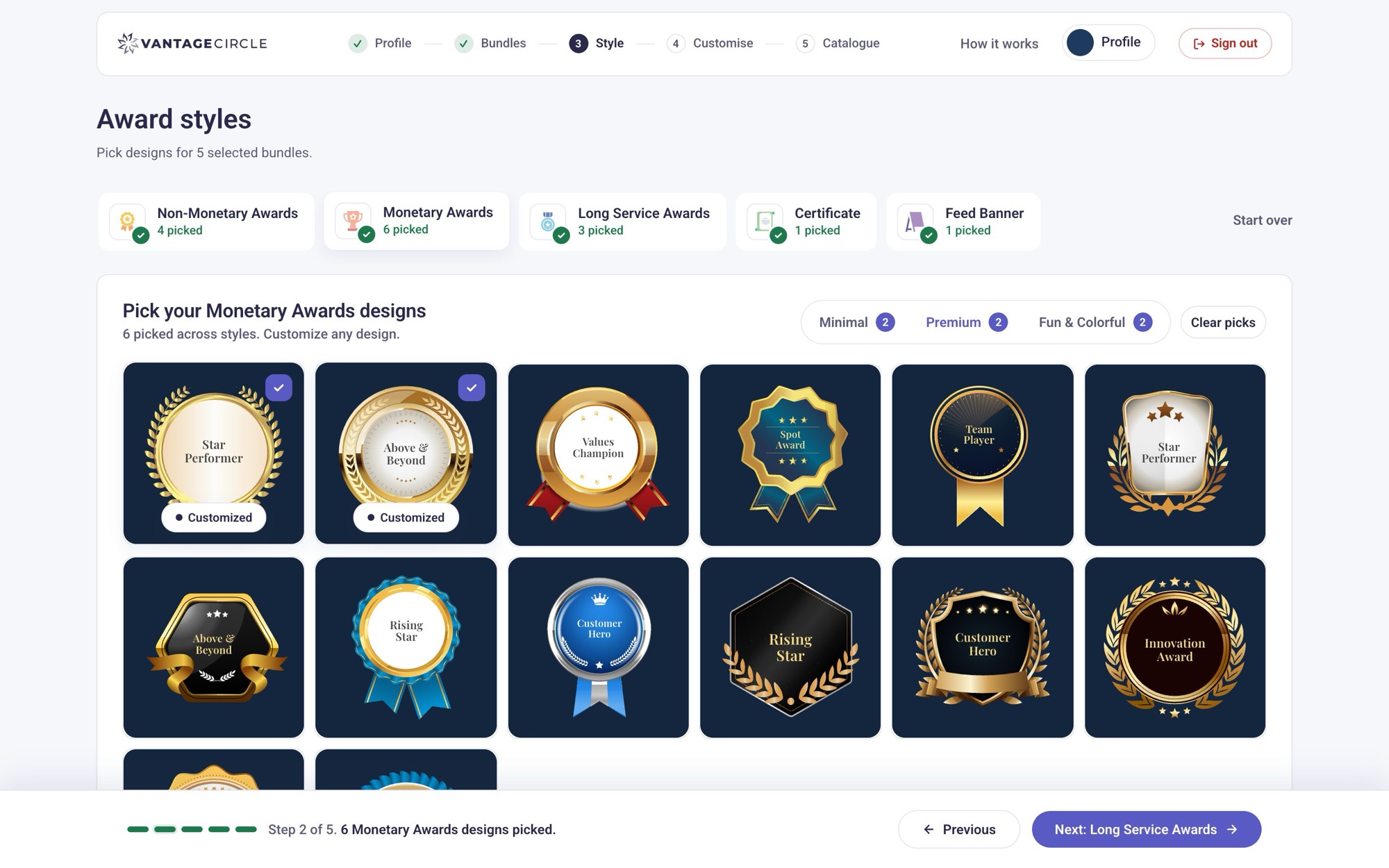
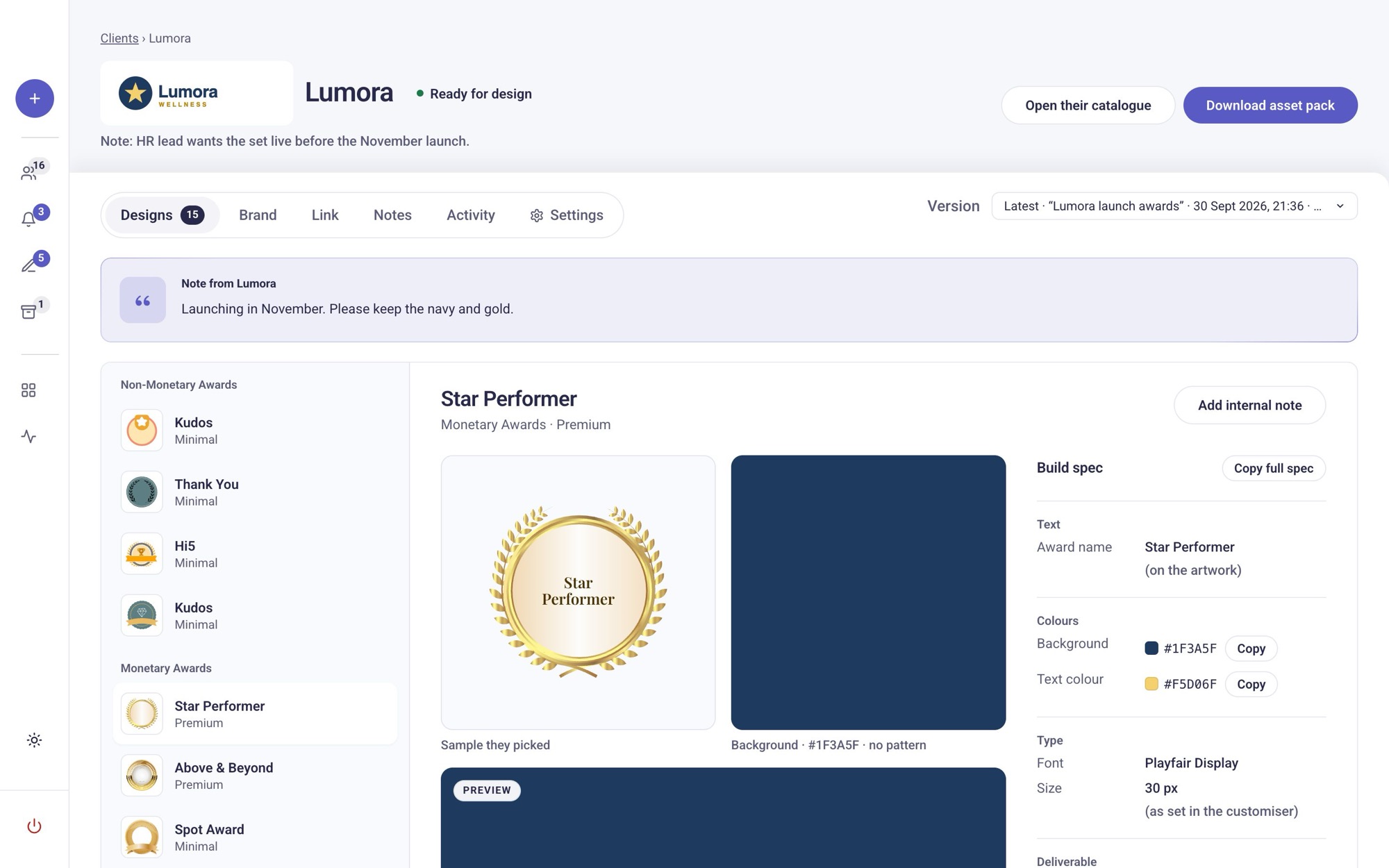
Real productThe design gallery for a sample client, Lumora. Every sample already carries their navy, and placeholder text is replaced with real award names.
Problem
Every question was an email, and every email was a wait
Every new client onboards with their own logo and colours, but the catalogue we sent was a static PDF of generic designs. The first reply was almost always “can we see it in our brand?” That started a chain: designers built one-off mockups, sent them over, waited for feedback, then revised and sent them again. Specs such as hex codes, fonts and award names were scattered across the thread and pieced back together by hand.
No single step was slow. The buffer time between replies was: a day here, two days there, while each side waited on the other. It cost design hours on mockups nobody ships and onboarding that stalled for a week or more.
Goal: let clients answer their own questions on screen, so the only thing that reaches the team is a finished, complete brief.
Before: static PDF + email
5–10 days · 4+ email rounds
Day 1✉ Generic PDF emailed to the client
Day 2✉ “Can we see it with our logo?”
Day 2–3✉ Designers hand-build 3–4 mockups and send them
Day 4–7✉ Revision rounds, with a wait for every reply
Day 8+Approval, then production finally starts
After: Catalogue Studio
1–2 days (target) · one link, one submission
Minute 0Client opens their personal invite link
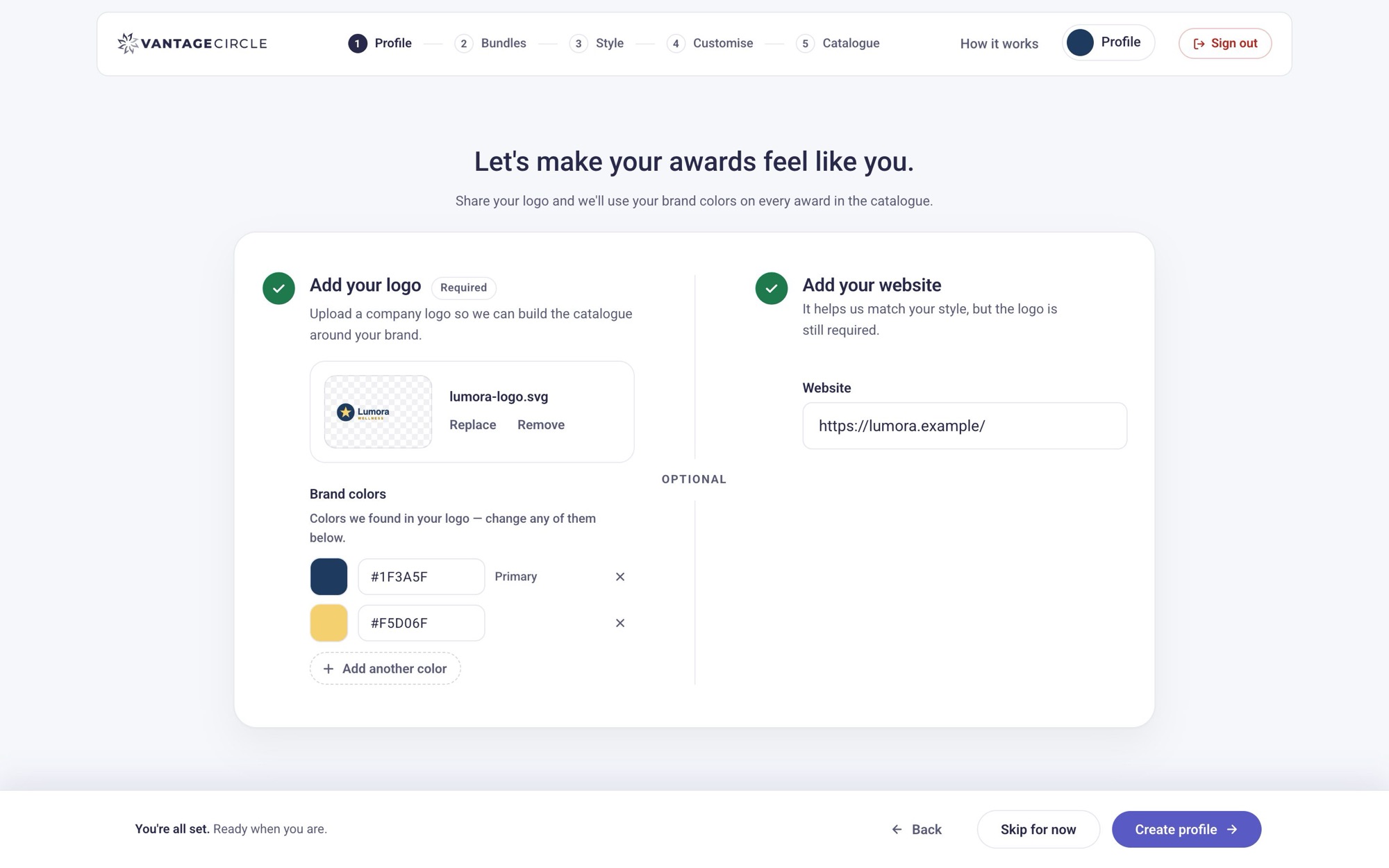
Minute 1Uploads a logo, and the brand palette appears
Minute 5Browses every collateral rendered in their brand
Minute 15Customises, builds a catalogue, shares it internally
Day 1–2“Submit for design”: a complete spec lands with the team. No thread to untangle
Solution
Brand first, then everything renders in it
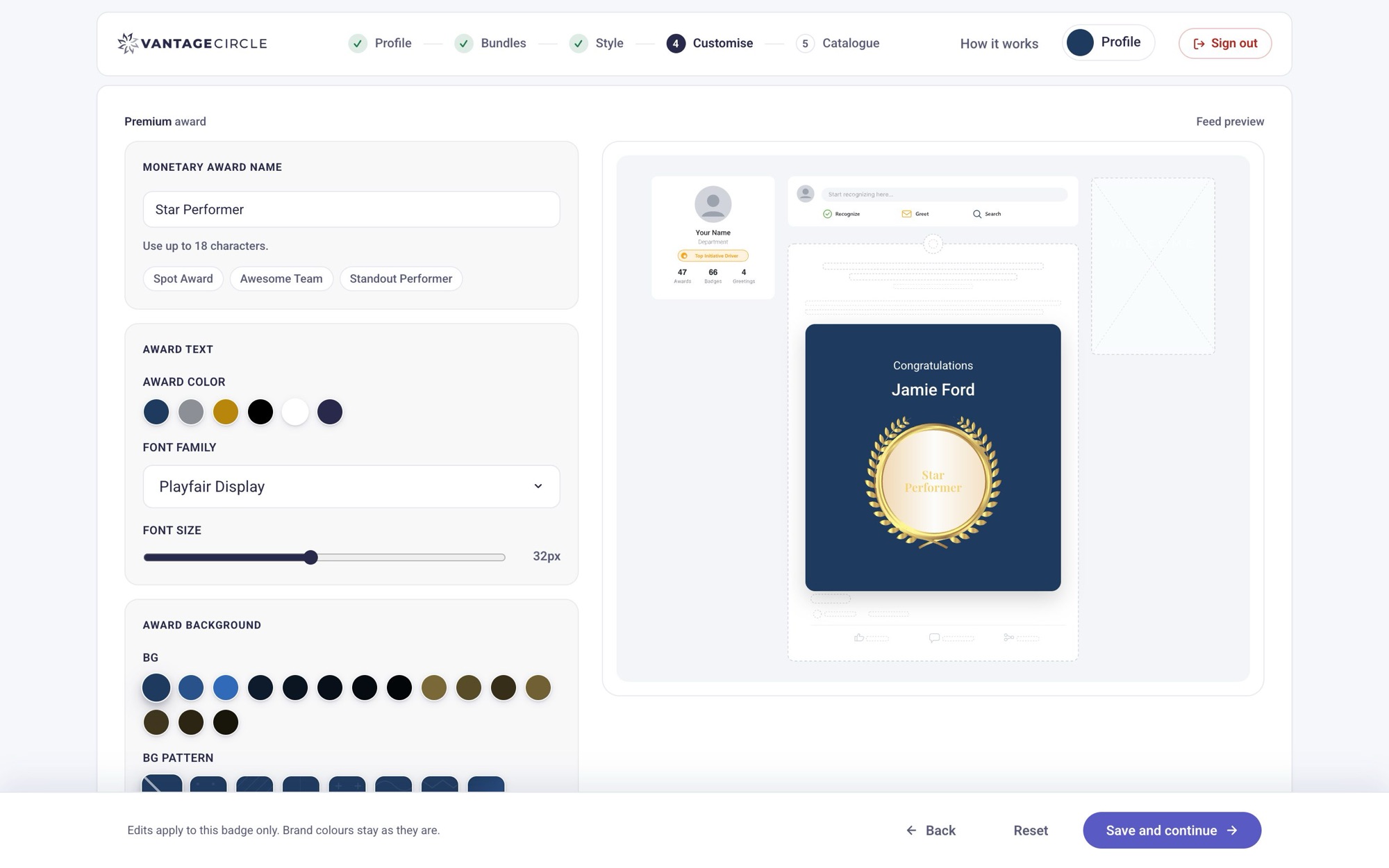
The flow captures the brand once and reuses it everywhere. The logo’s colours are extracted automatically. The award background becomes a darker shade of the primary colour, and text colours are picked to contrast with it, so the result looks on-brand before the client touches a control.
From there it’s a guided path: Profile → Collaterals → Style → Customise → Catalogue → Submit. Clients pick from eight collaterals and three visual styles (Minimal, Premium, Fun), with around 200 real sample designs. On the other side, the team gets a workspace with each client’s stage, a build spec per design (hex, type, pattern, deliverable size), and a one-click asset pack.
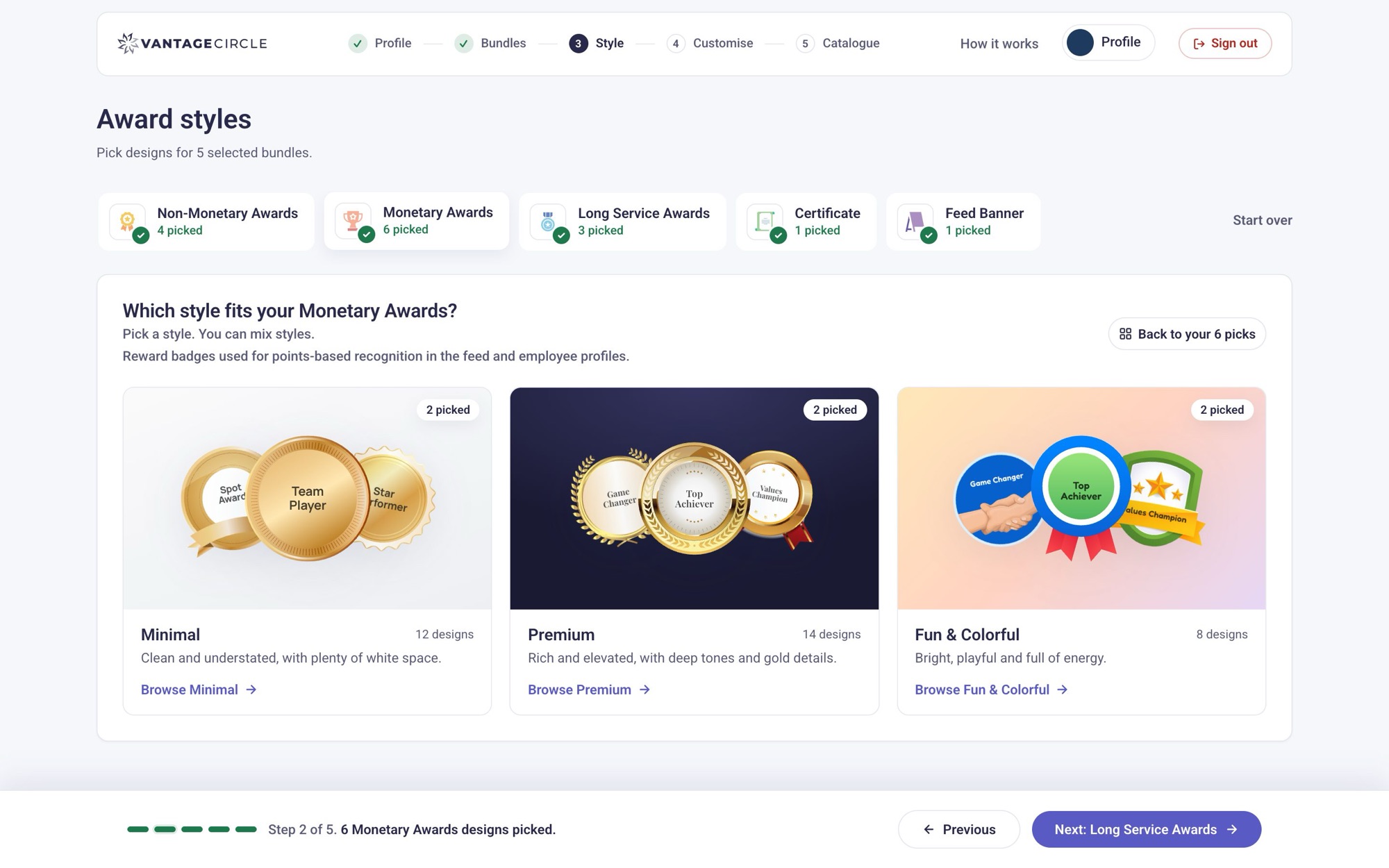
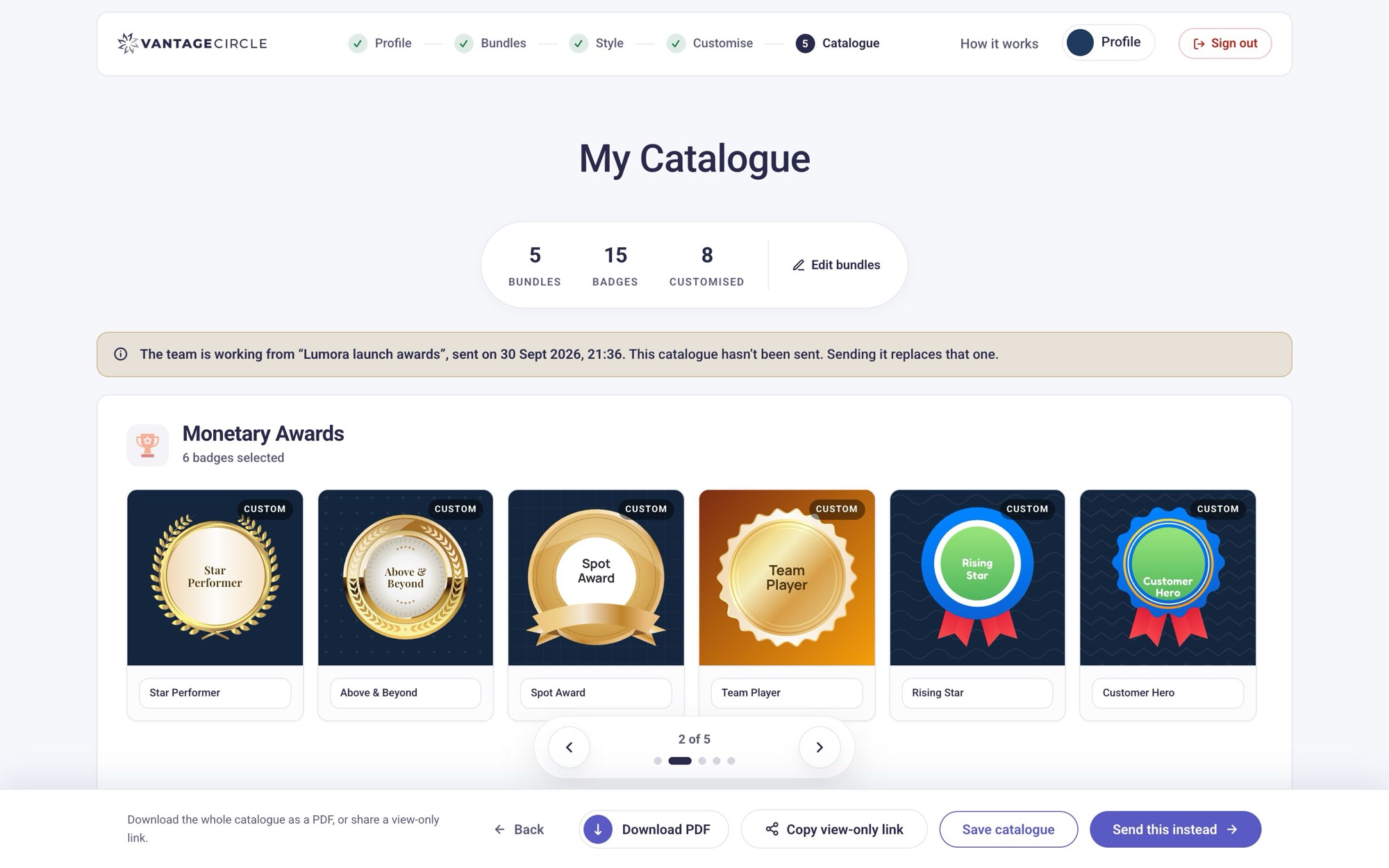
1 · ProfileUpload a logo; the brand colours are found automatically and can be adjusted.2 · CollateralsChoose collaterals. Hovering one shows exactly where it appears on the platform.3 · StyleEvery collateral opens on three style directions, shown with real samples.4 · CustomiseCustomise inside a faithful copy of the recognition feed, not on a blank canvas.5 · CatalogueThe catalogue: every pick in their brand, shareable, and one click from “Submit for design”.Process
Prototype fast, then make it real
Pitch it, scaffold it
I pitched the idea to a product designer, who scaffolded the first frontend and visual design: brand capture, hover-to-preview mockups and a style picker.
Make it trustworthy
Customisation with saved state that survives reloads, brand-derived colour rules, a PDF export, and the use cases written down as fixed acceptance rules.
One system
I took the UI/UX forward: a “Soft Glass” design system, one shared nav and action bar, a guided in-page tour, and a redesign of each screen onto it.
Backend and real clients
I built the backend and API: invite links, per-client storage, submissions and a staff workspace with build specs. Then came multiple catalogues, and performance, security and QA passes before handover.
Before → after
What changed, and why
The same two screens a month apart, captured from the project history.
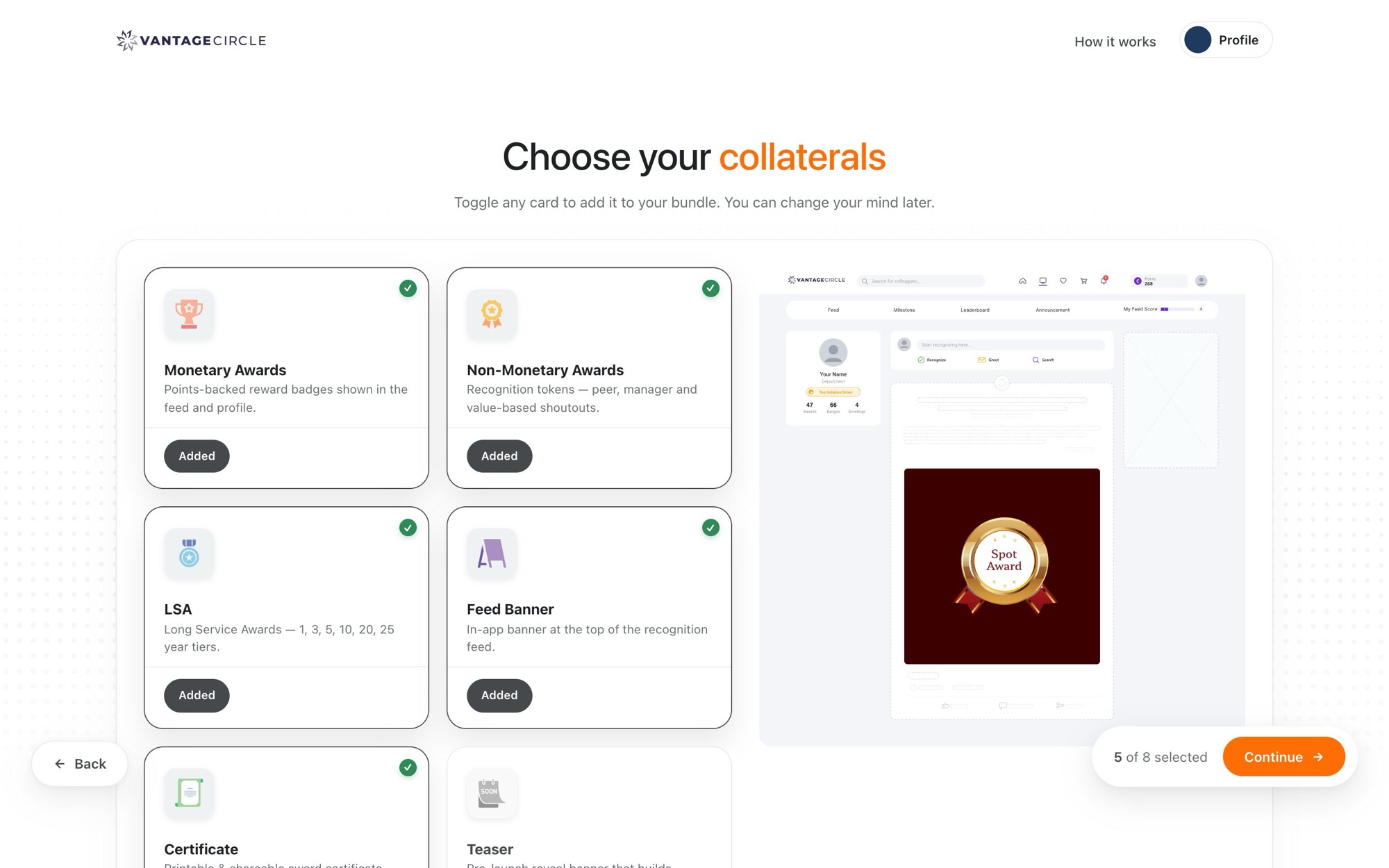
Client: choosing collaterals
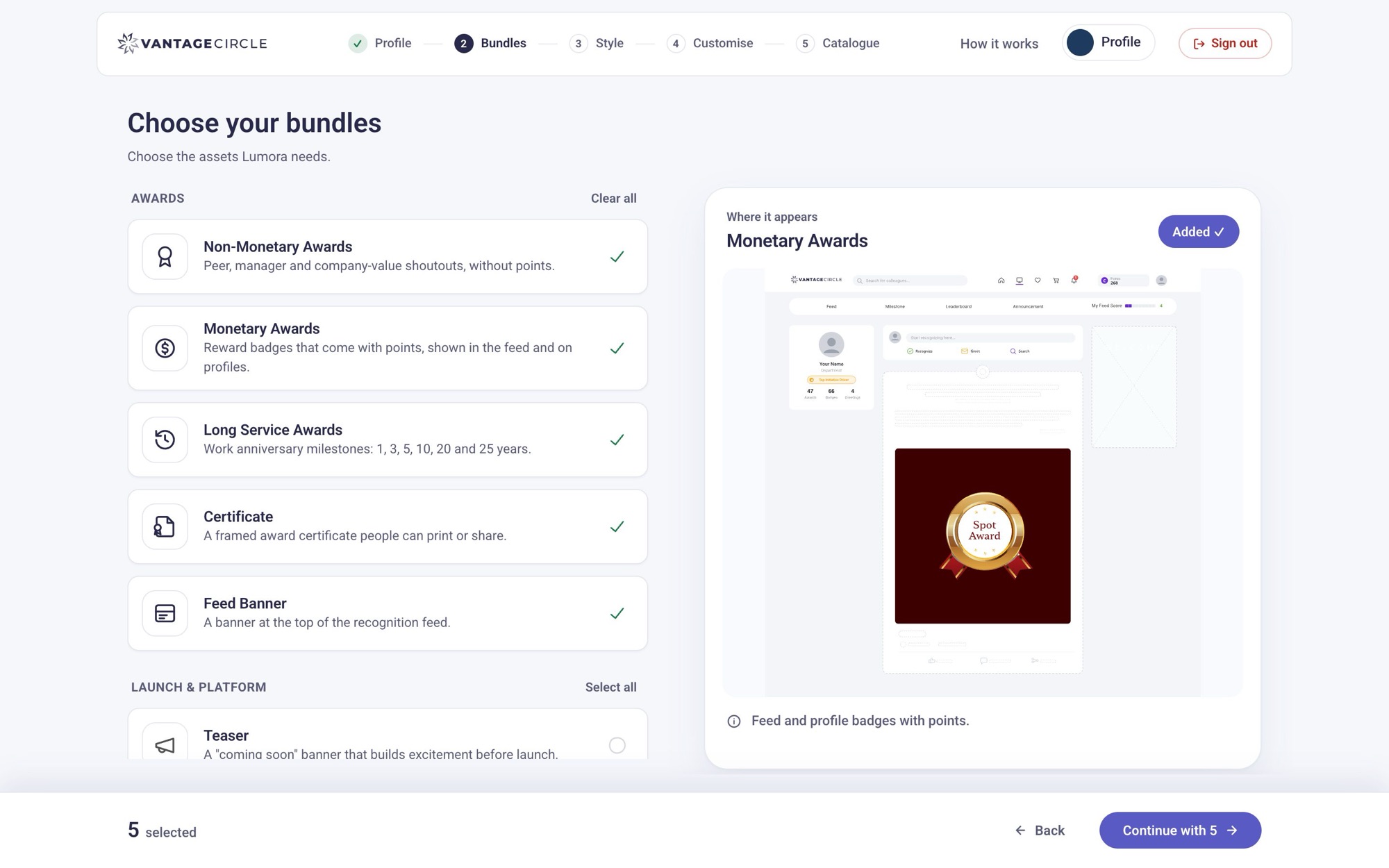
29 AugA two-column grid of large cards, each with its own “Added” button. Floating Back and Continue buttons.NowGrouped rows with checkboxes, a preview that follows the pointer and keyboard, and one bar for the next step.
Scan, don’t scrollTall cards in two columns meant hunting for what was picked. Full-width rows read top to bottom, with one clear tick per row.
Group by purpose“Awards” and “Launch & platform”, each with Select all, match how clients think about the rollout.
The preview is the decisionIt now follows keyboard focus as well as hover, and stays on the last item instead of snapping back to a blank wireframe.
One place for “next”Floating pills covered content and moved between pages. A fixed bar with the count and the next step is the same on every screen.
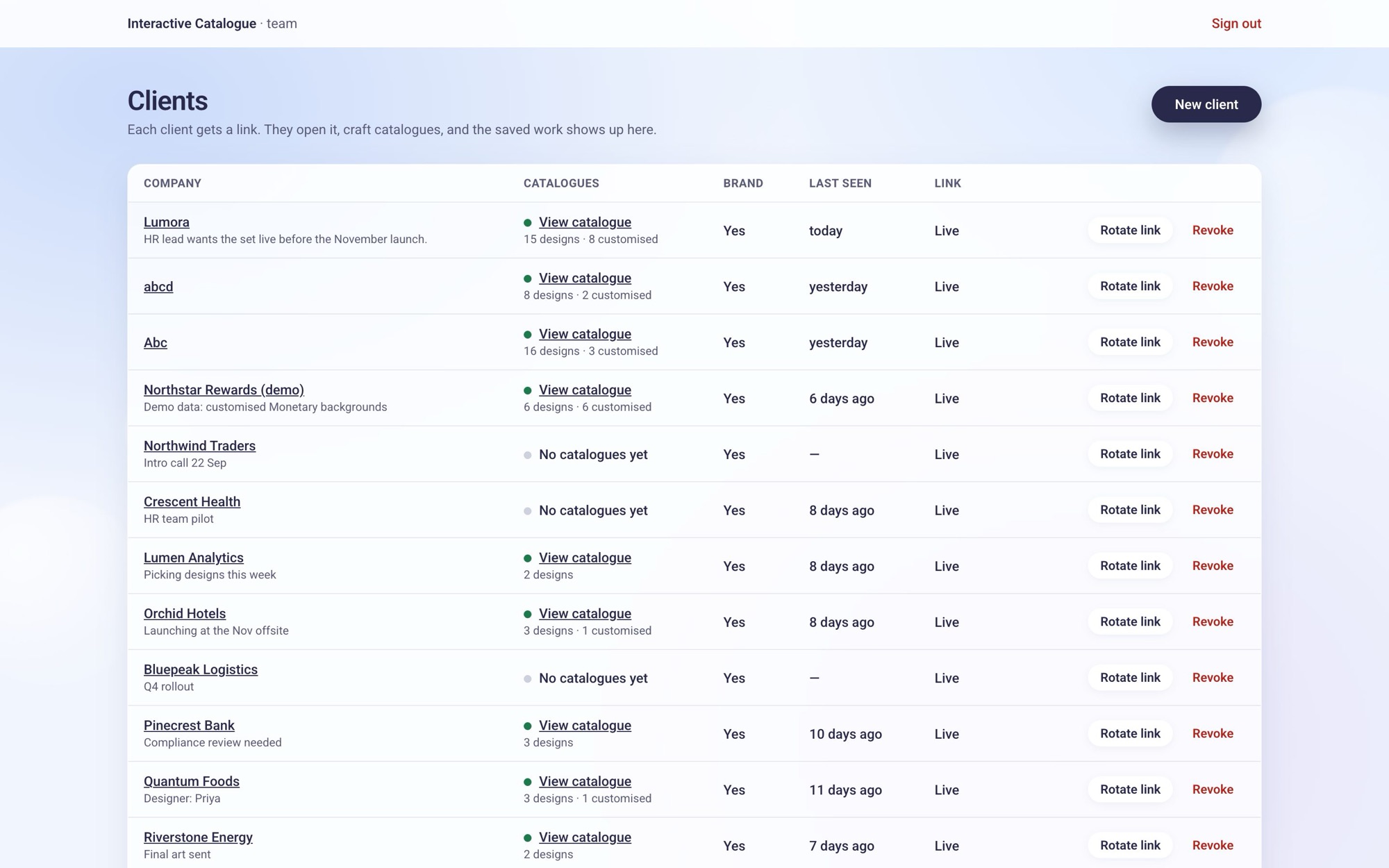
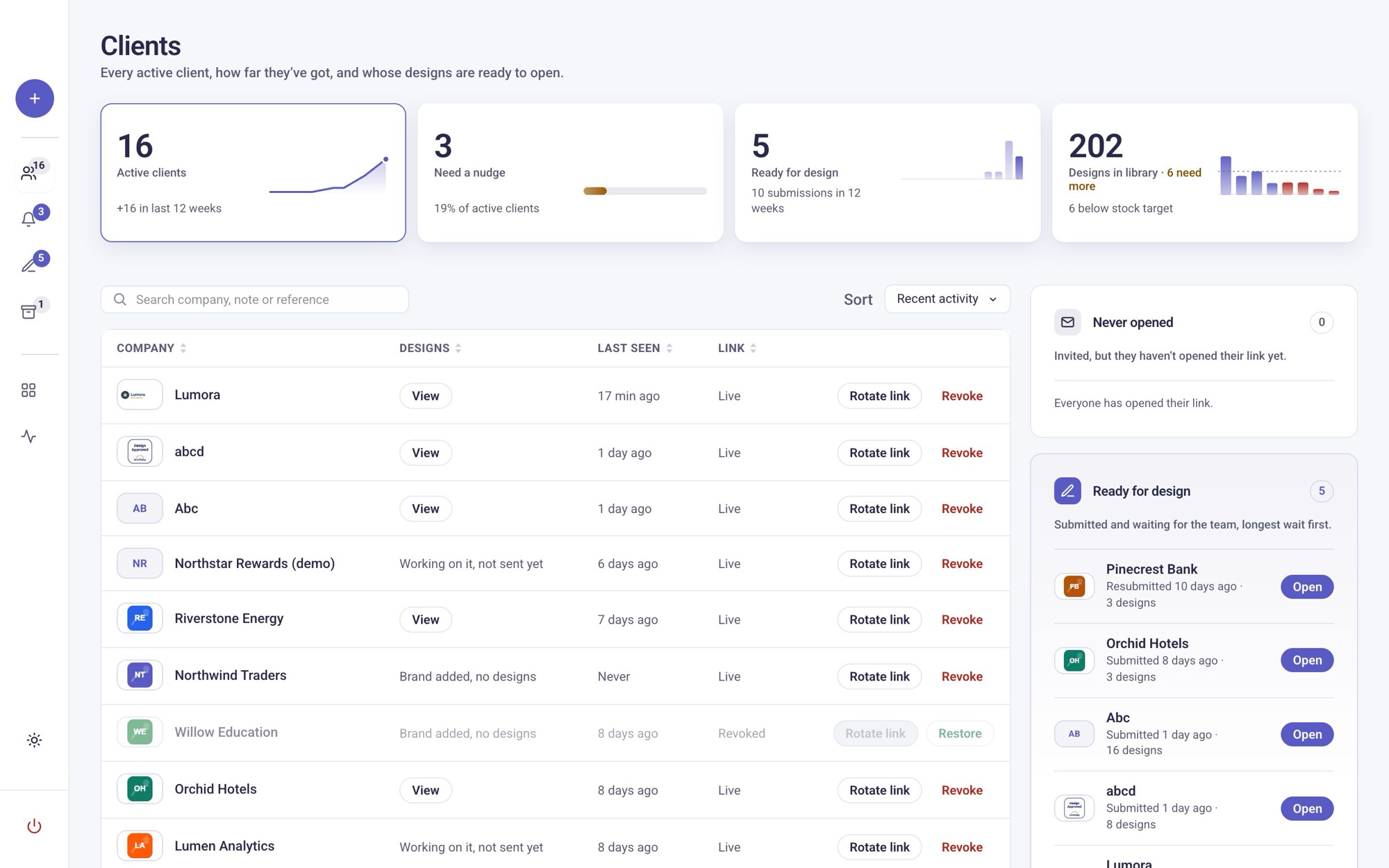
Staff: the client list
21 SeptAn inventory table: every row weighted the same, links underlined, actions repeated on every line.NowHeadline numbers with trends, a “who needs me” column, and a quieter table.
Answer “who needs me?” firstThe team opens this page to act, not to browse. Ready for design and Never opened are pulled out into their own cards, longest wait first.
Numbers with directionFour tiles with small charts show growth, nudges, the submission trend and library stock at a glance.
One emphasis per rowCompany, then a single View action. Dates, link status and counts drop to quiet secondary text.
A real workspaceA sidebar with live counts, search and sort, logos for quick recognition, and a design library page.
Design decisions
The calls that shaped it
Match the real platform, not a pretty mockup
I measured the live recognition feed and rebuilt the preview to its proportions.
Placeholder text is swapped at runtime for real names like Spot Award or Rising Star, set in a typeface per style.
WhyA preview that flatters sets up a disappointing delivery, and blank placeholders made the styles hard to judge. When the product team’s own two screens disagreed, I flagged it rather than pick one quietly.
Every collateral opens on style cards
Minimal, Premium and Fun show fanned real samples before the gallery.
Background and text shades are derived from the logo, and some collaterals lock their background because the platform does.
WhyAround 200 designs is a wall. Choosing a direction first cut the decision to one step at a time, and fewer knobs meant fewer off-brand submissions for the team to push back on.
Design for the designer receiving it
The staff side shows a build spec (hex, font, size, pattern, export size) and a ready-to-use asset pack.
WhyThe handoff is the product for half its users. It removes the “what colour was that?” thread.
Only one thing asks for attention
In the client list every stage is plain text, except Ready for design, which gets a dot.
WhyIt’s the only state that asks the team to act. With a colour for every stage, nothing stood out.
Scope out, not half-build
Uploads, revision rounds and a client/team chat were built, then deliberately switched off for launch.
WhyA focused first phase shipped. The rest waits behind a single switch, not a rewrite.
The other half of the product
A workspace for the team that builds it
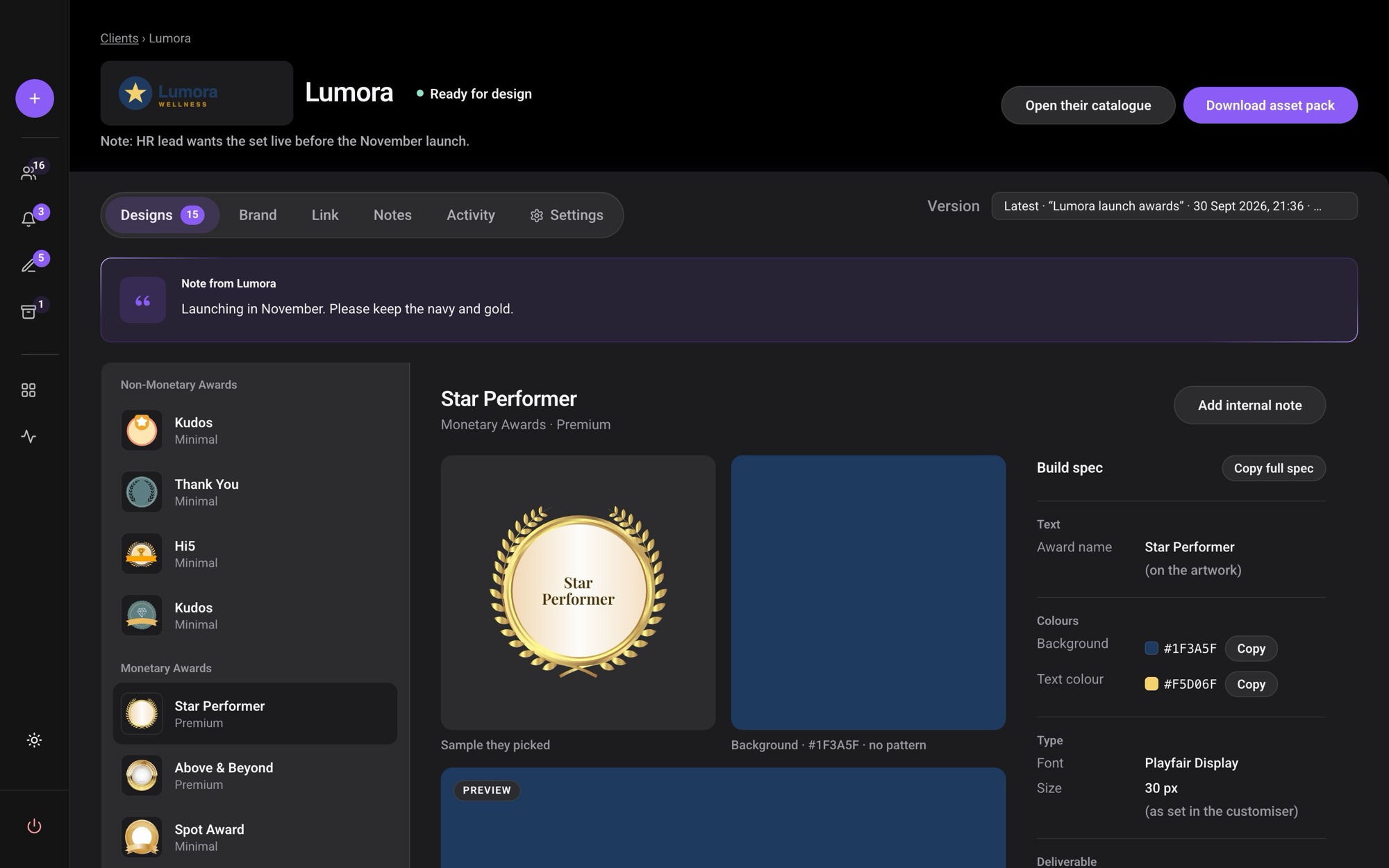
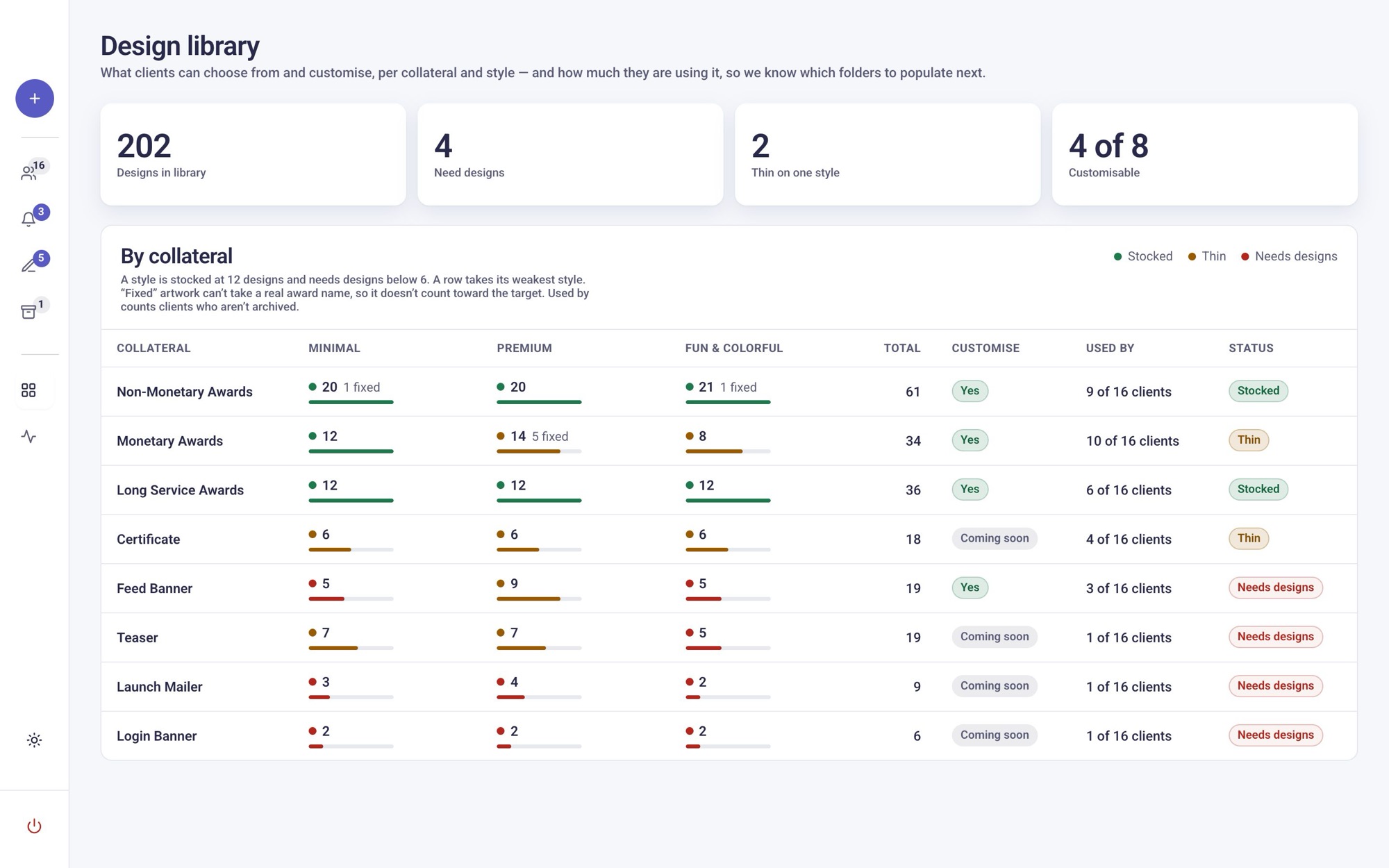
Stages, nudges and a per-design build spec replace the email thread. The design library shows which styles are thin, so we know what to design next. Dark mode was tuned for long review sessions: flat cards, brighter captions, no halos.
Staff · build specA submitted design with the client’s brief, the sample they picked, their background, and a copyable build spec.
Dark modeThe same view in dark mode.Design libraryThe design library: stock per collateral and style, and how many clients use each.
DashboardDashboard tiles: each number has a small chart, and only the figures that need action use a warning colour.Working with AI agents
Two people, working like a bigger team
With two of us, AI agents did most of the implementation. Claude Code and Codex often worked in parallel on the same codebase, while I set direction, made the calls and reviewed every result. What made it work was treating them like a team, not a code generator.
1
Shared project memory
A running decision log that every agent reads first, so a correction made in September (“the award name is part of the artwork”) outlives the session it was made in.
6
Parallel reviewers
A full audit split across client, server and admin. Six agents, each re-checking its own findings before reporting.
5
Fix agents, no collisions
Fixes split so each agent owned different files, which let them run at once without overwriting each other or the other AI working alongside.
✓
Verification over trust
Every claim was checked against the running app: measured timings, forged-token tests, tests before deploy.
Challenges
Where it got hard
Private access without accounts
Clients get a personal invite link: no sign-up, no password to forget. Each link opens only that company’s workspace. Revoking or replacing a link ends access everywhere within a minute, even in tabs already open. Share links are view-only. The team sees only the catalogue a client chooses to send, never their drafts. Link-preview scanners in email and chat no longer count as a client “opening” their invite.
No lost work, no silent overwrites
Clients work across days, tabs and devices. Every save is versioned, so an old tab or a second laptop can’t overwrite newer work. When that happens, the newer copy wins and the client is told. Saved catalogues merge between devices instead of the last save replacing the rest.
Getting it ready for real clients
Pages felt slow because requests were handled on one continent and the database sat on another; fewer round trips and smarter caching cut page loads by two-thirds. A full audit before launch found 49 issues — the most serious would have let a client reach the staff workspace, and others let unsafe text or links slip into shared pages — all fixed, tested and deployed the same day. Once the value was clear, the right move was to fold the whole thing into Vantage’s client dashboard rather than keep a separate app, and I wrote the handover pack for that port.
Results
What it changed
AdoptionMerging
Being integrated into Vantage Circle’s client dashboard as a product feature.
Back-and-forth4+emails →1
Email rounds before design could start, down to one invite link and one in-app submission.
Onboarding5–10days →1–2
Designed-for target: brief to production-ready spec.
Speed580ms →196
Client page load. Saves went from 1.0 s to 0.34 s.
Quality48→99
Audit score after 49 issues found and fixed across client, server and admin.
The part that mattered was removing the waiting. A client opens an invite link, works
through the catalogue over several days and across devices, and sends a build-ready brief
without a single email round. It is now being folded into Vantage Circle’s client
dashboard rather than kept as a separate app. The two numbers still missing are the ones
only time gives you: how many clients run it, and how many design hours it saves.